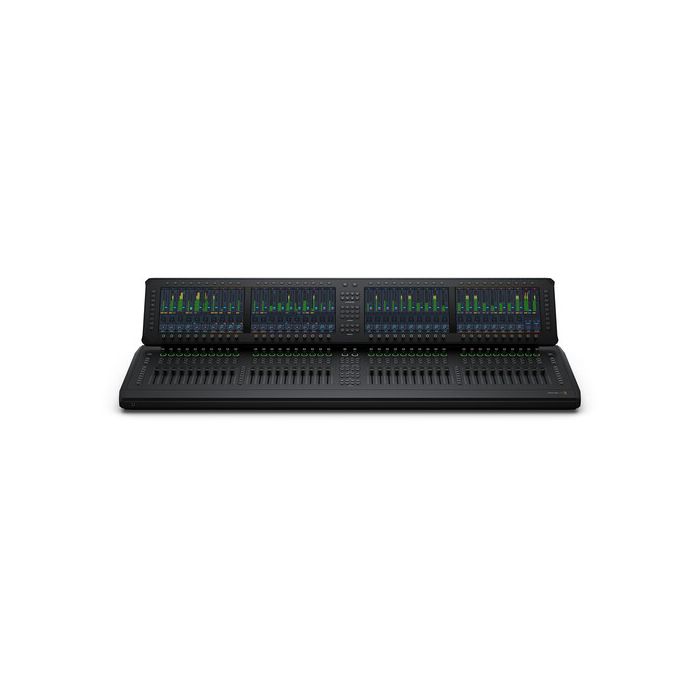
Blackmagic Design Fairlight Live Audio Panel 40
by Blackmagic DesignFairlight Live is the world's most powerful live audio mixer. Unlike traditional hardware based audio mixers, Fairlight Live is a software-based mixer, so it can support incredibly powerful features such as spatial audio mixing and SMPTE-2110 broadcast workflows.
- Plaćanje na rate Plaćajte na rate Visa, Visa Premium, Maestro, MasterCard i Diners kreditnim karticama. Više detalja provjerite na linku Načini plaćanja.
- Brza dostava Za sve narudžbe unutar RH zaprimljene do 14h dostava će biti izvršena sljedećeg radnog dana*. Za cijelu Europu vršimo brzu dostavu, a više detalja provjerite na linku Načini dostave.
- Međunarodna kupnja EU tvrtke(osim RH) s valjanim VAT ID brojem plaćaju cijenu bez PDV-a. Cijena će se obračunati prilikom check out-a. Svi kupci izvan EU plaćaju izvoznu cijenu bez PDV-a.
Sadržaj pakiranja
- Fairlight Live Audio Panel 40
- Welcome wallet with QR code for software download
Fairlight Live is the world's most powerful live audio mixer. Unlike traditional hardware based audio mixers, Fairlight Live is a software-based mixer, so it can support incredibly powerful features such as spatial audio mixing and SMPTE-2110 broadcast workflows. It even supports full redundancy! Fairlight Live easily handles hundreds or even thousands of audio channels, depending on your computer. Plus, it works with standard computer audio or USB audio from ATEM live production switchers. This means you get a fully customizable live audio mixer with built-in effects and professional features such as a cue player, talkback busses, third-party plug-in support, snapshots and so much more!
Engineer Your Own Live Mixes
Whether you're a podcaster using a professional audio mixer for the first time or a sound engineer used to working with hundreds of channels, Fairlight Live has everything you need! It's easy to get started as Fairlight Live can run on your laptop. As your production grows, Fairlight Live makes it easy to manage multiple cameras, microphones, headphones and mix-minus feeds. You can even add a professional Fairlight Live Audio Panel for greater speed and control. Fairlight Live handles the largest broadcasts, with support for hundreds of channels plus commentary, crowd mics, IFB and talkback. Fairlight Live also scales effortlessly from simple podcasts to complex live productions!
Audio Podcasts
Fairlight Live is perfect for simple audio podcasts with two microphones. It offers low-latency monitoring and straightforward routing, allowing you to record and mix in real time. You can create clean professional live audio right from your laptop.
Video Podcasts
For video podcasts with multiple cameras, mics, mix-minus feeds and live switching, Fairlight Live gives you an integrated audio and video workflow. Your host can focus on their guests while the mixer handles complex routing and monitoring.
Live Sports Broadcasts
Fairlight Live can manage thousands of channels including commentary, crowd mics, IFB, and talkback. Engineers can control complex routing and multiple outputs in real time, keeping audio aligned with fast-paced camera switching and broadcast demands.
Fully Customizable Software Mixer
Fairlight Live makes it easy to design your own mixer with flexible audio workflows that are perfect for any project from stereo to 5.1 surround or immersive formats. Add, modify or move inputs and busses at any time. You can easily change a four host panel into a remote guest setup, or route a stereo input to an ambisonics bus in seconds. Simply right-click the channel number in the mixer to update inputs. Or use the window menu for bus management and I/O patching. Audio channels can be managed in the tracks index to show, hide or rearrange inputs and busses. Plus there is an extensive native plugin library, EQ, dynamics and support for 3rd-party AU and VST plugins to enhance your mix.
Create a Fairlight Live Show
All of your productions are saved as a complete show including the mixer layout, routing, processing, cue player, snapshots and more! The file menu lets you quickly open existing shows or create a new one. To accelerate setup, factory templates for common workflows are included plus there are layouts to match supported ATEM live production switchers. Unique productions can be custom built in the new show dialog. If you are working on recurring events like talk shows or live sports you can save shows as user templates to instantly create the next episode based on your established mixer setup. Shows also include virtual soundcheck setups and media, plus key system settings such as solo mode.
Thousands of Input Channels!
From mono and stereo to LCR, 5.1 and fully immersive ambisonics, Fairlight Live supports hundreds and even thousands of input channels across a variety of formats. Each channel has built-in EQ, dynamics and panning options to control input levels, placement and clarity. Versatile format based panning includes 1D, 2D, 3D, and a spherical panner for ambisonics and spatial audio. Double-click a processing control in the mixer to open its control window, and press Escape to close. If your workflows include plug-ins, you’ll find four effects slots per channel with ChainFX hosting six-plugins per slot for up to 24 plugins per channel for your favorite native and 3rd party VST and AU effects!
Control Room and Studio Monitoring Controls
Fairlight Live provides control room monitoring for mix decisions as well as studio monitoring for talent and production, each serving a distinct role in live workflows. You can monitor studio inputs and outputs alongside the main control room meters in the monitoring panel. This lets you switch between sources and destinations to verify individual signal paths without affecting the on-air mix. The mixer can drive multiple speaker arrays and supports monitoring standard formats from mono to 5.1 and binaural, via headphones. For immersive workflows, you can use binaural head tracking with AirPods Pro to monitor ambisonic busses. This enables real-time positioning and checking of complex audio environments.
Build Your Own Bussing Structure
Create a customized bussing structure in Fairlight Live with flexible signal paths in standard formats that can be added, changed or rearranged dynamically as your show evolves. Use the bus management window via the window menu to add main, sub, aux or mix-minus busses, and choose their format, name and color. Assign input-to-bus or bus-to-bus routing in the bus assign window or right in the mixer! Save time by assigning multiple mixer channels simultaneously. Built-in intelligence offers automatic up/down bus conversion for cross format compatibility. You can route commentary to a main bus, crowd mics to sub-busses, in-ear talent feeds to mix-minus, and camera foldbacks to aux busses.
Main Busses
Main busses manage final output mixes for broadcast or streaming, including international versions with various languages or commentary as well as ensuring loudness compliance. Imagine routing a live sports feed to the main bus while creating an international English feed and monitoring LUFS levels.
Sub Busses
Sub busses act as direct patches from assigned channels, creating sub-mixes for easier management of related signals. In a talk show, guest microphones can be routed to a sub bus, allowing independent control of volume from the main mix, streamlining level adjustments during live production.
Aux Busses
Aux busses provide independent level and pan control with adjustable pre or post-fader switching. They can host group FX processing and create custom mixes for talent. Hosts and guests can receive personalized headphone mixes with processing applied while the main program mix remains untouched.
Mix Minus Busses
Dedicated mix-minus busses deliver talkback feeds with independent level and pan control and pre or post-fader routing. In live broadcasts, commentators hear the program mix or other commentators minus their own mic to prevent feedback, while keeping communication with producers or on‑air guests.
Output Matrix Busses for Multiple Destinations
You can use the output matrix busses for distributing unique mixes to multiple, separate destinations like stage monitors, translation feeds or recording devices without touching the main program mix! These versatile outputs receive audio from other busses, and are the live audio solution for creating tailored feeds for complex live productions. Supporting up to eight simultaneous output mixes, Fairlight Live offers quick matrix setup and routing with precise level controls so you can balance and feed a mix to the live stream, another to the broadcast truck and a third to the remote production teams. It’s all managed dynamically so you maintain consistency across every output, in real time!
VCA Master Controls
When you need to streamline your mixes VCA masters can control the relative volume of multiple channels and busses at once with a single fader! Fairlight Live supports up to 128 VCA groups with options in the show settings dialog to move faders and allow mute or solo override. Click the VCA field on a mixer channel to assign a VCA group, name groups in the index and manage your VCAs in the VCA assign window. These are a great way to quickly adjust common inputs such as host microphones, or all drum inputs for a studio band. There’s even support for nested VCAs so one VCA master can adjust all commentator mics together, while nested VCAs allow independent control of play‑by‑play commentators.
Native Plug-ins and Processing
Every channel in Fairlight Live includes a full set of built-in effects, giving you fast access to essential processing. Each input or bus features a 6-band EQ, expander/gate, compressor, limiter and panner for detailed control over tone and dynamics. Fairlight Live also has an extensive library of 30 native plug-ins covering de-essers, reverb, delay and more. 3rd-party AU and VST plug-ins are also supported. The ChainFX plug-in can expand 4 effects slots to 24 plug-ins. Beginners will find handy presets to improve their mix, while professional audio engineers using complex effects chains will feel at home with precision and control under changing conditions, without interrupting the show.
Professional Broadcast Features
Fairlight Live has a complete set of broadcast features for live production reliability and integrated control. You can quickly setup and manage four talkback groups, communicate with talent and crew using cue/conference mode and route mix-minus busses to deliver clean feeds to remote guests. Additionally, the input settings dialog on each channel offers input delay which aligns signals for timing accuracy and remote gain for mic preamps adjustment at the source. When it’s show time, On-Air mode locks critical functions to prevent disruption of the live program. Plus you get audio follows video (AFV) for switching audio based on the live camera, dual inputs for redundancy and more!
Cue Player for Audio and MIDI Cues
Fairlight Live features a built-in cue player that provides two types of cues, supporting 16 audio cues for jingles, carts and stingers, and 16 MIDI cues for controlling hardware such as lighting and smoke machines. Each cue can be triggered via a user defined keyboard shortcut, cue button on a Fairlight Live console or 3rd party MIDI control. This allows precise timing during live productions. In a live talk show, a producer can instantly activate an ON AIR light and play a segment intro jingle without interrupting the main mix. This integration keeps cue playback consistent, repeatable and easy to manage during live operation reducing the risk of errors during broadcasts.
Test Tones and Signal Generators
Built-in signal generators provide you with a complete set of tools for system testing, calibration and troubleshooting. The generators include an oscillator, tones, noise, a media player capable of playing audio files from a folder such as music, and a slate with independent controls to trigger any of these sources. You can use the generator settings dialog to control the levels and settings. The I/O patching dialog routes each generator source to any channel, bus, or output for system checks and alignment without external hardware. During a live production setup, you can run tones to verify levels, use noise to check dynamics or play reference audio to confirm balance across outputs.
Record and Playback, Virtual Soundcheck
Capture your live performance and rehearsal using Fairlight Live’s built-in record and playback system! You can use these recordings for virtual sound check (VSC), allowing your talent and crew to rehearse with an accurate playback of the live mix, saving time and reducing on-air errors. A band’s rehearsal can be recorded and replayed via VSC, letting audio engineers fine tune levels, EQ, dynamics, panning and cues ahead of the broadcast. This is important as it means that when the show goes live, the audio is consistent, balanced, and optimized across all outputs. You get a professional, polished sound while giving your production team full control over every detail of the mix.
Solo Monitoring with AFL and PFL
Fairlight Live has pre-fader (PFL) and after-fader (AFL) solo monitoring, so you can listen and audition individual channels or busses without affecting the main mix. Switch between listening to an input before fader adjustments to confirm it’s set at a good level or after fader adjustments to hear how it will sound in the mix. Quickly switch between these two listening options with an Alt-click. A dedicated pre-fader backstop mode keeps a consistent reference so the listening level doesn’t jump suddenly when channels are soloed. With these solo options, you can PFL a commentator mic to check levels while listening to the program bus in immersive audio without interrupting the live output.
Snapshots for Instant Recall
Snapshots let you save and recall the entire mixer state, providing a powerful tool for show setup and real-time control. Fairlight Live snapshots can be sequenced between different segments such as broadcast commentary, half time performances or musical acts. Transition controls create smooth fades between snapshots. Each snapshot can store specific configurations for individual acts, while excluding parameters from recall when needed to retain flexibility. During a live sports broadcast with a halftime concert, you can instantly recall a snapshot for commentary, then seamlessly transition to the music mix, keeping levels, EQ and effects perfectly aligned for each segment.
Designed for SMPTE-2110
Designed for SMPTE 2110 workflows, Fairlight Live provides full 2110 audio integration for modern IP-based broadcast production. The application supports primary I/O for seamless connection to 2110 networks, allowing engineers to extract specific audio streams from any source. PTP clock synchronization ensures precise timing across all devices, while sample level delay compensation keeps audio perfectly aligned with video and other streams. In a multi-camera live sports broadcast, commentary, crowd mics and program feeds can be extracted, routed and mixed in real time with accurate sync, maintaining high-quality, low-latency IP audio delivery across the facility.
Works with ATEM Live Production Switchers
Designed to integrate with ATEM live production switchers, Fairlight Live connects via USB-C for direct control and audio exchange. It supports audio follows video (AFV) camera selection for up to 100 cameras, routing audio from the switcher into the mixer for processing and mixing before returning it to the program output. You can manage talkback and solo monitoring, with bi-directional microphone gain control ensuring consistent levels between systems. Supported ATEM models include default mixer settings and templates, along with full on-air status control. This means that in a multi-camera production, cutting between cameras automatically brings the correct audio into the audio mix!
Audio Follows Video for ATEM Switchers
Integrated audio follows video (AFV) control links camera switching directly to the audio mix, supporting up to 100 cameras assigned across channels, busses and VCAs. Any signal path can be controlled by a single camera, with separate level control before the fader for precise gain staging. You can set fade curves and hold times for smooth, natural transitions. AFV can be driven directly from an ATEM switcher via active camera selection, keeping audio aligned with video at all times. This workflow is ideal in a talk show where cutting between hosts and guests automatically brings the correct microphone into the mix, maintaining clear and balanced dialogue without constant manual adjustment.
USB and Computer Audio
You can connect to a wide range of audio systems using either USB or Thunderbolt, including Fairlight Live Audio Panels and supported 3rd-party devices. On Mac, the system uses Core Audio for low latency performance and broad compatibility, while on Windows it supports System Audio and ASIO drivers for professional routing and control. This means that you can connect microphones, interfaces and playback sources directly into the mixer with minimal setup. When you are working on a live stream or podcast, you can combine multiple USB interfaces and computer audio sources into a single workflow. It’s easy to keep production stable, scalable and easy to manage during a show.
Operation Workflow Modes
Primary Mode
The primary mode operates as the full featured system, providing complete control of all inputs and outputs within the mixer. It serves as the main engine for live production, handling routing, processing, monitoring and broadcast delivery with full system authority.
Failsafe Mode
Failsafe mode uses a secondary system that mirrors the primary, ready to step in if a failure occurs. In a live sports broadcast this means that if the main mixer crashes mid-game, the secondary system automatically takes over, keeping commentary, crowd mics and program feeds uninterrupted.
Prep Mode
Prep mode allows you to build and test shows offline without affecting the live system. This means that a church service can be prepared ahead of time, programming snapshots for sermons, hymns and musical performances so that when the service goes live, transitions and routing are already optimized.
Remote Mode
Remote mode supports multiple operators on separate computers. A primary retains full control while remote systems manage assigned channels or parameters. The lead engineer can handle the main mix, while a remote operator mixes audience mics and foldbacks, each with independent solo and monitoring.
On Air Mode
When large broadcast productions have multiple audio engineers working on different parts of a mix, it’s critical to prevent any changes to the live audio output. Fairlight Live has a secure On-Air mode which locks out other users to prevent accidental changes to main audio outputs during live productions. On air mode also synchronizes the On-Air status with an ATEM switcher, ensuring the mixer accurately reflects your program status. When active, On-Air mode safeguards your mix from changes to formats, channel additions or deletions, solo mode activation, sync adjustments, plug-in replacements and more. On Air mode ensures that all your essential audio paths are protected while on‑air!
Fairlight Live Audio Panels
Designed in collaboration with professional sound engineers, Fairlight Live Audio Panels streamline your workflow, acting as a natural extension of the software. The intuitive, task based design puts the controls you need right at your fingertips. This means you can spend more time being creative and work much faster than is possible with a keyboard and mouse! There’s a large touchscreen for every group of 10 faders so you see a graphical display of everything happening on the panel. You can see channel strip information, levels, EQ, dynamics processing, plug-in interfaces and more! With three models to choose from, they are ideal for home studios, small suites or large live broadcasts.
| Connections | |
| 2110 IP Video and Audio Networks | 2 x 10G RJ45 Ethernet connections. |
| Senders and Receivers per 10G Pair | Supports 2110 IP video and audio plus analog audio in and out of panel. |
| 1G Control Network | 1 x 1G RJ45 for computer connection, configuration and software updates. |
| HDMI Monitor Outputs | 1 |
| Analog Audio Inputs | 1 x 3-pin XLR for mic level analog audio. |
| 1 x 5-pin XLR for talkback headset. | |
| Analog Audio Outputs | 2 x 3-pin XLR for line level analog audio. |
| 1 x 5-pin XLR for talkback headset. | |
| 2 x 6.35mm headphone jack. | |
| Computer Interface | 1 x USB Type-C for computer connection, software configuration and software updates. |
| HDMI Video Output | 1 x HDMI Type A. |
| Power | 2 x IEC C14 power inputs. |
| Display | |
| techspecs:built-in-display | 4 x 11.6 inch 1920 x 1080 LCD touch screens. |
| techspecs:hdmi-out | HD or Ultra HD |
| Video Standards | 720p50, 720p59.94, 720p60 |
| 1080i50, 1080i59.94, 1080i60 | |
| 1080p23.98, 1080p24, 1080p25, 1080p29.97, 1080p30, 1080p50, 1080p59.94, 1080p60 | |
| 2160p23.98, 2160p24, 2160p25, 2160p29.97, 2160p30, 2160p50, 2160p59.94, 2160p60 | |
| Controls | |
| Channel Faders | 40 flying faders. |
| Channel Rotary Knobs | 40 multi function rotary knobs with ring LED indicators. |
| Channel Control Buttons | Select, Solo and Mute for each channel. |
| Channel Focus | Processing and input controls for selected channel. |
| Contextual Rotary Knobs | 40 rotary knobs to adjust associated parameters appearing on lower row of focus and view screens. |
| Contextual Buttons | 40 buttons to activate functions or adjust parameters appearing on upper row of focus and view screens. |
| On Line Button | Online mode follows timecode from external source. |
| On Air Button | On Air mode locks panel. |
| Player/Recorder Keypad | Controls for the Player/Recorder support recording performances/ rehearsals, |
| playback for Virtual Sound Checks | |
| Cue Player Keypad | Cue Player controls - Jingle/Cart player for SFX stingers plus supports MIDI cues for triggering external devices. |
| Snapshots Keypad | Store and recall mixer settings and configurations. |
| Control Room and Monitoring Keypad | Controls for source selection and monitor circuit selection. |
| Masters Keypad | Controls for master views and enabling masters on faders. View Only selection sends metering views to screen, |
| when off selection targets faders. | |
| Globals Keypad | Global controls include forward, back, undo and escape plus access the setup screen and 3 x USER defined buttons. |
| Talkback Keypad | Controls for talkback to 4 groups, direct to channel and ALL. Dedicated cue mode button plus access the talkback setup screen. |
| Talkback | |
| Microphone | 1 x built in talkback microphone. |
| Talkback Connections | 1 x 5-pin XLR headset |
| 1 x 3-pin XLR Mic input | |
| 2 x 6.35mm headphone sockets | |
| 2 x 3-pin XLR audio monitor outputs. | |
| Talkback Selection | Talkback groups, direct to channel, or all. |
| Talkback Groups | 4 |
| Software | |
| Software Included | Fairlight Live |
| Blackmagic OS | |
| Internal software upgrade via updater application. | |
| Operating Systems | Mac 15.0 Sequoia, |
| Mac 26.0 Tahoe or later. | |
| Windows 11 | |
| Settings Control | Fairlight Live software when connected by Ethernet or USB. |
| Power Requirements | |
| Power Supply | 2 x 100 - 240V AC 50/60Hz internal power supplies. |
| Power Inputs | 2 x IEC C14 sockets. |
| Power Usage | TBC |
| Physical Specifications | 52.68 in |
| 10.75 in | |
| 18.82 in | |
| LB TBC | |
| Environmental Specifications | |
| Operating Temperature | 0° to 40°C (32° to 104°F) |
| Storage Temperature | -20° to 60°C (-4° to 140°F) |
| Relative Humidity | 0% to 90% non- condensing |
- Novo
- Novo
- Novo
- Novo
- Novo
- Novo
- Novo