Blackmagic Design Fairlight Console LCD Monitor
by Blackmagic DesignFor DaVinci Resolve 17 Systems
Add a Monitor per Fairlight Console Bay
- Plaćanje na rate Plaćajte na rate Visa, Visa Premium, Maestro, MasterCard i Diners kreditnim karticama. Više detalja provjerite na linku Načini plaćanja.
- Brza dostava Za sve narudžbe unutar RH zaprimljene do 14h dostava će biti izvršena sljedećeg radnog dana*. Za cijelu Europu vršimo brzu dostavu, a više detalja provjerite na linku Načini dostave.
- Međunarodna kupnja EU tvrtke(osim RH) s valjanim VAT ID brojem plaćaju cijenu bez PDV-a. Cijena će se obračunati prilikom check out-a. Svi kupci izvan EU plaćaju izvoznu cijenu bez PDV-a.
Sadržaj pakiranja
- Blackmagic Design Fairlight Console LCD Monitor
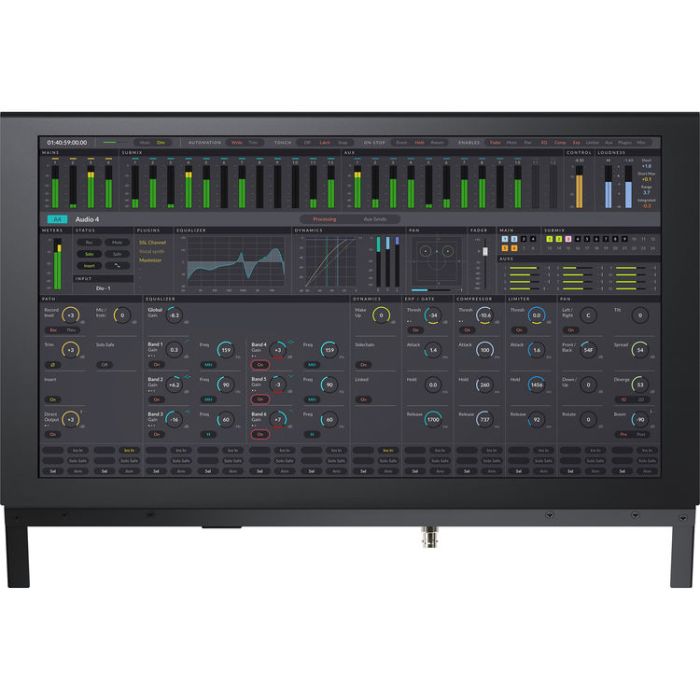
Equip every bay of your Fairlight console with a Blackmagic Design Fairlight Console LCD Monitor to achieve versatile and comprehensive visual referencing for your DaVinci Resolve 17 system. This self-contained computer and high-resolution display combo features Ethernet, HDMI, and SDI connectivity to accept video signal from various sources such as a channel control panel, a computer, and a DeckLink interface.
When configured with a Fairlight channel control panel, the Fairlight Console LCD Monitor provides graphical feedback for the panel's controls, even as you adjust them in real time. Paired with a Fairlight Audio Editor, this LCD monitor will show you the DaVinci Resolve GUI without relying on an additional monitor. Run a video feed from your DeckLink or UltraStudio interface into the BNC SDI input to use the Fairlight Console LCD Monitor for lip sync checks with full-screen video previewing.
Clear Visual Reference
Depending on the task, you'll see individual channel information in-line with each fader strip below, all parameters when used in single-channel mode, or all controls for master mode. Previewing the video program while mixing and editing allows you to see the talent up close; you get a detailed view of character faces for checking lip sync. You can add a Fairlight Console LCD Monitor to every bay.
Graphical Channel Control Feedback
DaVinci Resolve User Interface
Full-Screen Video Preview Monitor
Configuration and Updates via USB Type-C
Convenient Software Upgrades
Internal Power Supply
| OS Compatibility |
macOS 10.15 or Later
Windows 10 (64-Bit) |
| Ports |
1 x RJ45 Ethernet (10/100/1000 Base-T)
1 x HDMI Type-A Female Input 1 x BNC Female 3G-SDI Input 1 x USB Type-C (Software Configuration and Software Updates) |
| SDI Rate | 1.5G, 3G |
| HDMI Standards |
1080p23.98, 1080p24, 1080p25, 1080p29.97, 1080p30, 1080p50, 1080p59.94, 1080p60
|
| SDI Standards |
1080p23.98, 1080p24, 1080p25, 1080p29.97, 1080p30, 1080p50, 1080p59.94, 1080p60, 1080i50, 1080i59.94, and 1080i60
|
| SDI Compliance |
SMPTE 259M, SMPTE 292M, SMPTE 296M, SMPTE 424M-B, and SMPTE 425 Level A and Level B
|
| SDI Video Sampling | 04:02:02 |
| SDI Color Precision | 10-Bit |
| SDI Color Space | YUV |
| Power Supply |
Internal: 100 to 240 VAC at 50/60 Hz, IEC C14 Mains Input
|
| Power Usage |
20 W Maximum
|
| Operating Temperature |
32 to 104°F / 0 to 40°C
|
| Storage Temperature |
-4 to 140°F / -20 to 60°C
|
| Relative Humidity |
0 to 90% Noncondensing
|
| Dimensions |
19.3 x 4.8 x 12.9" / 49 x 12.1 x 32.8 cm
|
| Weight | 9.9 lb / 4.5 kg |
| Packaging Info | |
| Package Weight | 12.69 lb |
| Box Dimensions (LxWxH) |
22 x 17.5 x 6.6"
|
- Novo
- Novo
- Novo
- Novo
- Novo